TL;DR: MCP isn’t just a pipe; it’s a specific architectural pattern consisting of Hosts, Clients, and Servers. This post unpacks the “Sandwich Architecture” that allows AI agents to safely connect to local and remote resources.
This post is part of a MCP series. If you haven’t read Part 2 yet, start there to understand the protocol specification.
1. The “Sandwich” Architecture#
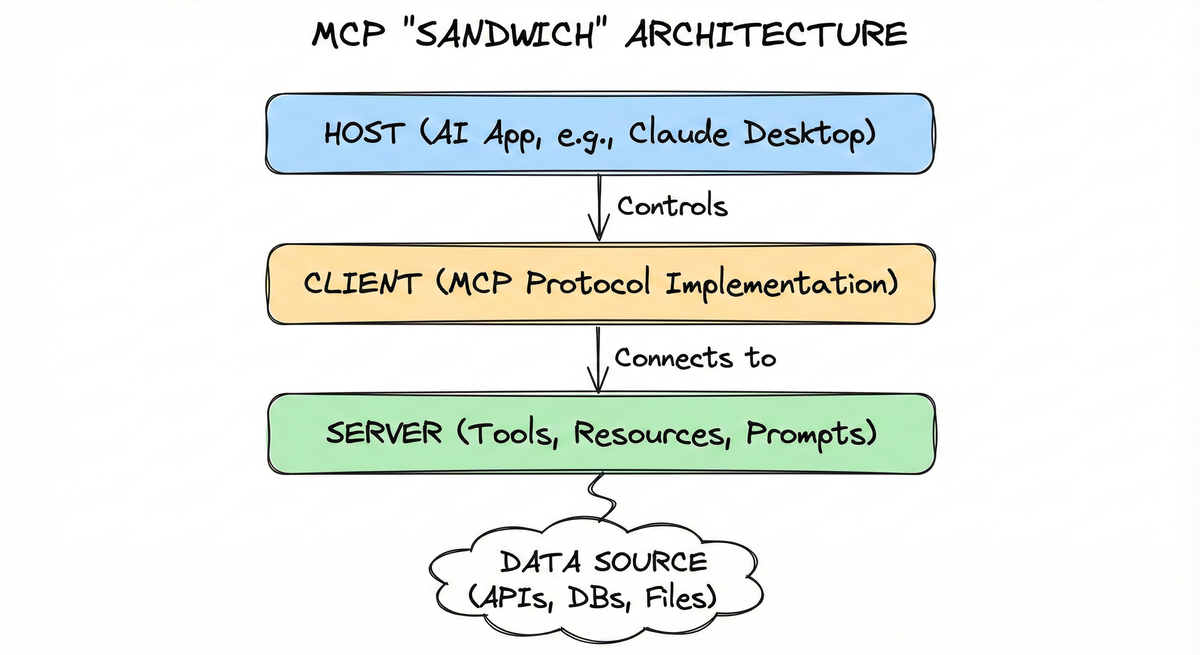
At a high level, MCP follows a client-host-server model, often described as a “sandwich” where the Host controls the Client, which connects to the Server.
graph TD
    subgraph "The Host Application"
        H["Host Process (e.g. Claude Desktop, IDE)"]
        C["MCP Client"]
    end

    subgraph "The External World"
        S["MCP Server"]
        D["Data Source (SQLite, Slack, GitHub)"]
    end

    H --"Controls"--> C
    C --"Transport Layer"--> S
    S --"Queries"--> D
2. Participants: The Three Pillars#
The Host: The container application (like Claude Desktop, Cursor, or your custom AI app) that coordinates and manages one or multiple MCP clients. The host serves as the “conversation controller,” managing the model’s context window, enforcing security policies, and coordinating context aggregation across multiple servers.
The Client: The protocol implementation that lives inside the host, that maintains a connection to an MCP server and obtains context from an MCP server for the MCP host to use. Its role is to handle protocol negotiation, manage the session, and route JSON-RPC messages bidirectionally between the host and the server.
The Server: A standalone program (local process or remote service) that provides specialized context and functionality. Servers expose their capabilities through primitives such as Tools, Resources, and Prompts and are intentionally kept simple to minimize implementation overhead.
graph TB
    subgraph "MCP Host (AI Application)"
        Client1["MCP Client 1"]
        Client2["MCP Client 2"]
        Client3["MCP Client 3"]
        Client4["MCP Client 4"]
    end

    ServerA["MCP Server A - Local
(e.g. Filesystem)"]
    ServerB["MCP Server B - Local
(e.g. Database)"]
    ServerC["MCP Server C - Remote
(e.g. Sentry)"]

    Client1 ---|"Dedicated
connection"| ServerA
    Client2 ---|"Dedicated
connection"| ServerB
    Client3 ---|"Dedicated
connection"| ServerC
    Client4 ---|"Dedicated
connection"| ServerC
3. Layers#
MCP consists of two layers:
- Transport layer: Defines the communication mechanisms and channels that enable data exchange between clients and servers, including transport-specific connection establishment, message framing, and authorization.
- Data layer: Defines the JSON-RPC based protocol for client-server communication, including lifecycle management, and core primitives, such as tools, resources, prompts and notifications.
3.1 Transport Layer: The Nervous System#
MCP defines how these components talk. Currently, there are two official standard transports:
| Transport | Best For | Mechanism |
|---|---|---|
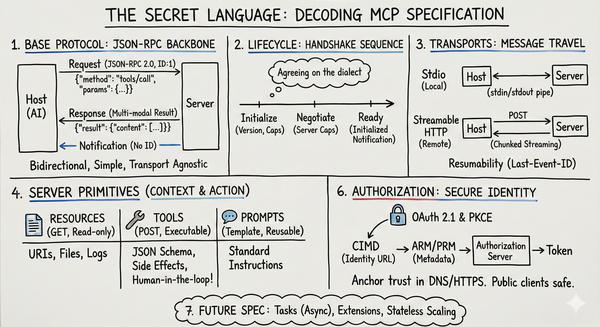
| Stdio | Local Integration | The Host spawns the Server as a subprocess. Communication happens over standard input/output pipes. Fast, secure by default (local only), and easy to debug. |
| Streamable HTTP Transport | Remote/Cloud | Uses HTTP Post for client-to-server messages and an SSE stream for server-to-client updates. Essential for “Remote MCP” where the agent and the tool are on different machines. |
3.2 Data Layer: The Language#
The data layer implements a JSON-RPC 2.0 based exchange protocol that defines the message structure and semantics. This layer includes:
- Lifecycle management: Handles connection initialization, capability negotiation, and connection termination between clients and servers
- Server features: Enables servers to provide core functionality including tools for AI actions, resources for context data, and prompts for interaction templates from and to the client
- Client features: Enables servers to ask the client to sample from the host LLM, elicit input from the user, and log messages to the client
- Utility features: Supports additional capabilities like notifications for real-time updates and progress tracking for long-running operations
4. Data Layer: Protocol in Action#
A core part of MCP is defining the schema and semantics between MCP clients and MCP servers. Developers will likely find the data layer — in particular, the set of primitives — to be the most interesting part of MCP. It is the part of MCP that defines the ways developers can share context from MCP servers to MCP clients.
4.1 Lifecycle: The Connection Dance#
The interaction between client and server begins with a handshake sequence. During the initialize phase, both parties explicitly declare their capabilities, such as whether the server supports resource subscriptions or if the client supports sampling.
4.2 Server Primitives: The Power Trio#
Once the session is “Ready”, the server provides context via three core Server Primitives:
- Resources: “Read-only” context objects (like files or DB records).
- Tools: Executable functions with side effects (like “create-ticket”).
- Prompts: Reusable templates for model interactions.
4.3 Client Primitives: Empowering the Server#
Additionally, servers can use Client-Side Primitives to ask the host for help:
- Sampling: Asking the host’s LLM to complete a prompt (recursive inference).
- Elicitation: Asking the user for additional information or confirmation.
sequenceDiagram
    participant Host
    participant Client
    participant Server
    Host->>Client: Create Client for Server
    Client->>Server: initialize (capabilities, version)
    Server-->>Client: initializeResult (server capabilities)
    Client->>Server: notifications/initialized
    Note over Client,Server: Stateful Connection Active
    Host->>Client: call_tool("sum", {a:5, b:7})
    Client->>Server: JSON-RPC request
    Server-->>Client: JSON-RPC response {result: 12}
    Client-->>Host: Tool Result
5. The Data Flow: A User Request Example#
When a user asks, “What’s the weather in Tokyo?”, the flow is specific:
- Discovery: The Client calls
tools/liston the Server. - Reasoning: The Host sends the tool definitions to the LLM. The LLM decides to call
get_weather(city="Tokyo"). - Execution: The Client sends a
tools/callrequest to the Server. - Result: The Server executes the code and returns the result (e.g., “18°C, Cloudy”).
- Context: The Host feeds this result back to the LLM to generate the final answer.
graph TD
      subgraph "User Request"
          U["User: 'What's the weather in Tokyo?'"]
      end
      subgraph "Host Application"
          H["Host Process"]
          C["MCP Client"]
          LLM["LLM"]
      end
      subgraph "External World"
          S["MCP Server"]
          D["Data Source (Weather API)"]
      end

      U -->|1. Initiates Request| H
      H -->|2. Sends Tool Definitions| LLM
      LLM -->|3. Decides to call get_weather| H
      H -->|4. Client calls tools/list| C
      C -->|5. Client sends tools/call| S
      S -->|6. Server executes code| D
      D -->|"7. Returns Result (e.g., '18°C, Cloudy')"| S
      S -->|8. Server returns result| C
      C -->|9. Host feeds result back| H
      H -->|10. LLM generates final answer| LLM
6. What’s Next?#
Coming up: Theory is great, but code is better. In the next post, we’ll build a fully functional Crypto Tracker MCP Server using FastMCP, connecting to real-world APIs and exposing Live data.