This post is part of a series. If you haven’t read Part 4 yet, start there to understand how we built a real-world MCP server.
TL;DR#
- Resource Exhaustion: MCP servers load all tool definitions upfront—GitHub MCP consumes 46,000+ tokens, with max reports of 66,000+ tokens before any conversation
- Security Surface: The Four Actor Model creates two trust boundaries, exposing systems to prompt injection, tool poisoning, and confused deputy attacks
- The Statefulness Tax: Stateful JSON-RPC connections complicate blue-green deployments, connection draining, and horizontal scaling
- Governance & Ops: No standardized identity model, auditing complexity for autonomous agents, and observability gaps across distributed servers
- Design Paradigms: MCP requires agent-centric design (inference from descriptions) not human-centric (read documentation, choose deliberately)
Introduction#
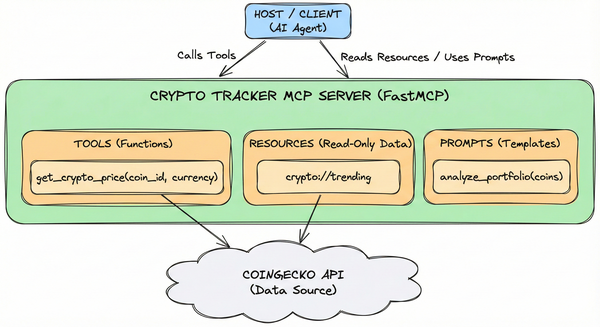
We built a working Crypto Tracker MCP server in Part 4. It fetches prices, exposes trending coins, and includes a financial analyst prompt. It works!
But MCP isn’t a silver bullet. It introduces real challenges that production engineers need to think about.
In this post, we’ll examine 5 core challenges of adopting MCP—not to discourage you, but to give you a realistic picture of the trade-offs.
1. Resource Exhaustion#
Challenge: Context + Latency#
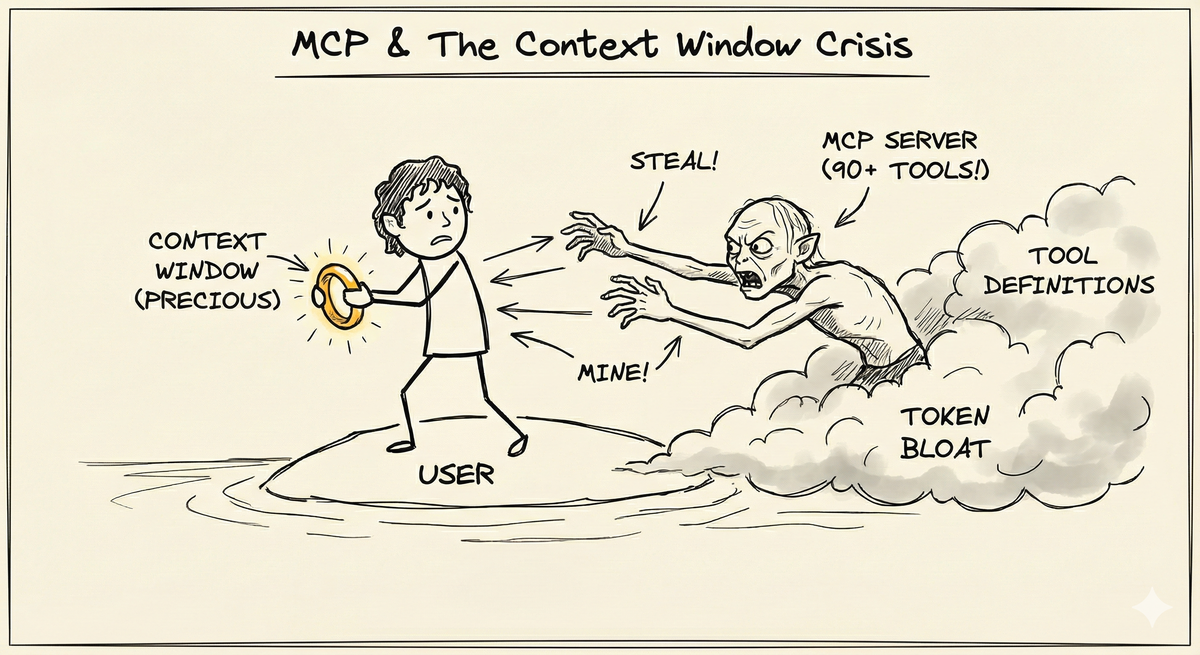
Think of it like, you’re Frodo protecting your ring (context window) while Gollum (MCP servers with lot of tools) constantly trying to steal your precious ring (context window).
MCP clients load all tool definitions from all connected servers upfront. Every tool name, description, parameter schema, and example gets stuffed into the context window before you ask your first question.
Remote MCP servers add round-trip latency for every tool call—traditional local function calls take microseconds, while remote MCP calls take milliseconds to seconds.
Evidence#
- GitHub MCP server: 90+ tools = 46,000+ tokens1
- Max reported: 66,000+ tokens consumed before any conversation2
- Context impact: ~22% of a 200k token context window from a single server3
- Tool selection accuracy: Drops when catalogs exceed 30–50 tools3
- Latency accumulation: Each remote tool call adds network round-trip time—multi-call workflows accumulate milliseconds to seconds of overhead
Multiply this across multiple servers—GitHub (90 tools), database (20 tools), file system (15 tools)—and you’ve lost 40-50% of your context window to tool metadata before starting.
Mitigation#
Architectural Alternatives:
- On-demand server management: Add MCP servers only when needed, remove when done
- Tool-specific configuration: Cherry-pick individual tools instead of loading all 90+ from GitHub MCP1
- Defer loading: Tools aren’t loaded until the host determines they’re relevant based on conversation context3
- Dynamic discovery: CLI tools like mcp-cli enable just-in-time tool schema inspection, reducing token usage by ~99% (47K → 400 tokens in tested scenarios)4
- Skills over MCP servers: Create Skills for CLI alternatives—GitHub CLI via Skill loads only commands you invoke, not all 90+ tools
- Code execution: Execute code to call the MCP server and pass only the final result back to LLM56
Latency Reduction:
- Local stdio servers: Run servers locally over stdin/stdout (no network overhead)
- Connection pooling: Reuse connections instead of establishing new ones
- Batch operations: Design tools to do more in fewer calls
The bottom line: Context is precious. Be ruthless about what you let into your context window.
Note: The remaining challenges (Security Surface, Statefulness Tax, Governance & Ops, Design Paradigms) primarily apply to enterprise-grade production MCP deployments. If you’re experimenting solo or building personal projects, treat these as forward-looking considerations. If you’re operating in an organization, treat them as table stakes.
2. The Security Surface#
Challenge: Trust Boundaries#
MCP creates novel security risks that don’t exist in traditional APIs.
Evidence#
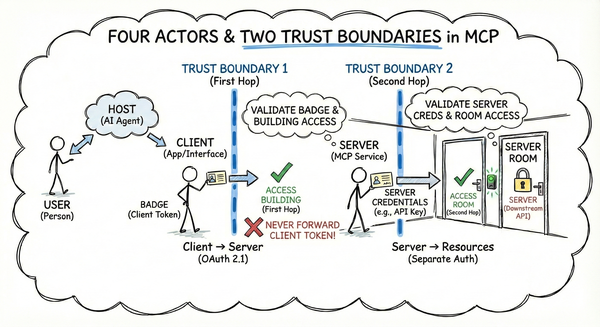
MCP involves four actors (User, Host, Client, Server) with two critical trust boundaries:
- First hop: Client → Server (OAuth 2.1, tokens, scopes)
- Second hop: Server → Resources (separate auth per API)
The autonomous agent model—where the Host decides which tools to call based on untrusted input—creates vulnerability to prompt injection. Malicious data can trick the AI into making unintended tool calls.
Hundreds of public MCP servers are misconfigured7, exposing users to security risks. Servers can dynamically modify tool definitions without user awareness.
Key Threats#
- Prompt Injection: Malicious input influences autonomous tool selection decisions
- Tool Poisoning: Compromised tool definitions execute without user awareness (LLMs auto-execute, humans rarely inspect)
- Confused Deputy Problem: The Host (helpful assistant) tricked into exposing credentials or modifying resources
- Supply Chain Risks: Misconfigured public servers, dynamic tool modification without awareness
- Data Leakage: Overly permissive servers leak data across sessions without proper user isolation
graph TD
    subgraph Local["Trust Zone: Local/Trusted"]
        User((User))
        Host[Host / App]
        Client[MCP Client]
        User -->|"Untrusted Input"| Host
        Host -->|"Control"| Client
    end

    B1((Auth / TLS))

    subgraph ServerZone["Trust Zone: MCP Server"]
        Server[MCP Server]
    end

    B2((API Keys / Scopes))
    Res[External Resources / APIs]

    Client -.-> B1
    B1 -.-> Server
    Server -.-> B2
    B2 -.-> Res

    style B1 stroke-dasharray: 5 5
    style B2 stroke-dasharray: 5 5
Threat → Defense Strategy#
| Threat | Defense |
|---|---|
| Prompt Injection | Input validation, sanitization, human oversight for sensitive operations |
| Tool Poisoning | Server vetting, schema validation, code review before adoption |
| Confused Deputy | OAuth 2.1, scopes, permissions, principle of least privilege |
| Supply Chain | TLS everywhere, authentication, rate limiting, source verification |
| Data Leakage | User isolation, scope validation, session separation |
Defense in depth is essential: Transport security (TLS), authentication (verify who’s calling), authorization (enforce what they can do), input validation (sanitize all inputs), rate limiting (prevent abuse), human oversight (require approval for sensitive operations).
3. The Statefulness Tax#
Challenge: Stateless REST → Stateful MCP#
MCP introduces stateful connections where REST was stateless. This architectural shift fundamentally changes deployment, scaling, and reliability.
REST: Stateless. Any instance handles any request. Horizontal scaling = add instances + load balancer in front. Simple.
MCP: Stateful. Each client maintains a persistent JSON-RPC connection to a specific server instance. Can’t load balance mid-connection.
Stateful Deployment#
Problem: Blue-green deployments require draining existing connections first—skip this step and connections drop mid-deployment. Can’t do rolling updates or canary releases easily with persistent connections. Must wait for in-flight requests to complete before stopping old server.
Solution: Graceful connection draining, health checks to detect unhealthy instances, wait for in-flight requests before stopping servers.
Horizontal Scaling#
Problem: Can’t simply “add more instances” like stateless REST. Need sticky sessions to route same client to same server instance instead of simple load balancing.
Solution: Connection pooling (limit max connections per instance, spin up more as needed), sticky sessions, graceful degradation (detect overload, reject new connections, scale up).
Reconnection Resilience#
Problem: When connections drop (network flakes, server crashes, deployments, client restarts), you need robust reconnection. Race conditions, duplicate requests, and state reconstruction all bite you.
Solution: Exponential backoff (retry with increasing delays to avoid thundering herd), idempotent operations (handle duplicate requests from reconnection), state persistence (maintain state across connections via database/cache or reconstruct on reconnect).
Availability Impact#
Problem: When your MCP server goes down, your LLM loses access to those tools. Server outage = AI capability outage. Downtime isn’t just “users can’t access data”—it’s “AI agents can’t complete tasks.”
Solution: High availability setups with multiple instances and automatic failover.
4. Governance & Ops#
Challenge: Production Readiness Gaps#
MCP is evolving rapidly, but governance and control mechanisms lag behind. Standardization is missing.
Evidence#
Identity Management:
- No standardized identity model for MCP
- Who is the User? (The human? The Host application?)
- How do you authenticate Users across multiple servers?
- How do you propagate identity from Client → Server → Resource?
- Every MCP server implements authentication differently (API keys, OAuth, nothing)
Auditing Complexity:
- When an autonomous agent makes 50 tool calls across 5 servers, who’s responsible?
- Traditional systems: “User X called endpoint Y at time Z”
- With MCP: User asked vague question → Host decided to call tools A, B, C → Each tool called different APIs → Who approved what? When?
- Makes compliance, forensics, and debugging difficult
Observability Gaps8:
- Need per-server tracking of: tool invocation patterns, context window usage, token consumption, rate limit violations
- Without proper observability, you’re flying blind
- Enterprise deployments require comprehensive monitoring dashboards, alerting, and governance integration
Budget Control9:
- How do you track costs across distributed MCP servers?
- Who pays for token consumption when multiple servers are involved?
- How do you set budget limits per team, per project, per user?
- Without governance frameworks, MCP costs can spiral
Ecosystem Maturity:
- MCP was announced in late 2024; as of early 2026, the ecosystem is still very young
- Limited server implementations: Fewer MCP servers than direct integrations; nothing battle-tested at scale for many use cases
- Best practices still evolving: How to structure tool descriptions, design resources, handle errors, version APIs, test end-to-end
- Fewer battle-tested examples: Most deployments are small-scale personal projects, PoCs, or internal enterprise deployments
Inconsistent Implementations:
- Different MCP servers implement similar capabilities differently
- One’s pagination parameters are another’s cursor-based approach
- One uses camelCase, another uses snake_case
- Inconsistencies compound across multiple servers
Mitigation#
- Implement observability from day one: Per-server monitoring of invocations, errors, token consumption
- Standardize authentication: Choose OAuth 2.1 or API keys consistently across your servers
- Budget controls: Set token consumption limits per team/project with automated alerts
- Configuration management: Version control for server configs to prevent drift
- Vet servers before adoption: Check maintenance history, update frequency, issue response time
5. Design Paradigms#
Challenge: Human-Centric vs. Agent-Centric Design#
Many people see MCP as “just a wrapper around REST APIs.” They’re missing the point.
Evidence#
REST APIs are designed for human developers who:
- Read documentation
- Choose endpoints deliberately
- Construct requests thoughtfully
- Handle responses explicitly
MCP servers are designed for AI agents that:
- Infer tool purposes from descriptions
- Chain tools autonomously
- Handle errors adaptively
- Optimize for context usage
The design constraints are completely different.
Inaccurate tool descriptions = incorrect tool calls10. Unlike human developers who read docs and make deliberate choices, LLMs rely entirely on tool descriptions to infer purpose and usage.
LLM Design Cheat Sheet#
When building MCP servers, design for agents, not humans:
Tool Granularity:
- Fewer tools = less context usage
- More tools = more flexibility for the LLM
- Trade-off: One tool with 20 parameters vs. 5 tools with 4 parameters each?
Description Quality:
- Clear, concise descriptions = accurate tool calls
- Invest time in writing descriptions that LLMs can infer from
- Include examples when helpful
- Avoid jargon that humans understand but LLMs misinterpret
Context-Efficient Responses:
- Return what the LLM needs, not what the API provides
- Server-side filtering and summarization save tokens
- Don’t return 10 pages of data when the LLM only needs the summary
- Design resources and tools to minimize response size
Semantic Naming:
get_user_profileis clearer thanfetchorretrieveanalyze_document_sentiment>process- The LLM will make better decisions with semantic, descriptive names
Parameter Design:
- Required parameters should be truly required
- Provide sensible defaults for optional parameters
- Use consistent naming conventions across tools (camelCase vs. snake_case)
- Document parameter constraints clearly (min/max, allowed values)
Error Handling:
- Return clear, actionable error messages
- LLMs need to understand why a call failed to retry or adapt
- Include suggestions for recovery in error responses
6. Enterprise Path: MCP Gateway#
If these challenges feel overwhelming for production deployment, you’re not alone. Enterprises are adopting MCP Gateways11—control planes that sit between AI agents and MCP servers, providing the security, state management, and governance that the protocol lacks.
What MCP Gateways Solve:
Security12: Centralized OAuth 2.1/JWT authentication, tool-level authorization (scopes like
mcp:tool:read:email), prompt injection detection, server catalog curation, and unified audit trails—no more implementing security in every serverStatefulness: Session-aware routing that maintains
session_id→ backend mappings, handling connection lifecycle, reconnection, and failover transparently. Shifts the statefulness burden from protocol implementation to infrastructure (Azure APIM, Docker, Solo.io agentgateway)Governance: Unified observability (OpenTelemetry metrics, token tracking, cost allocation), centralized identity propagation across all servers, policy enforcement (rate limiting, semantic caching, circuit breakers), and audit trails for compliance
The Trade-off: Gateways add infrastructure complexity but let you adopt MCP’s benefits without modifying individual servers. You get enterprise-grade security, horizontal scaling, and operational control at the control plane layer.
I’m writing a deep-dive series on MCP Gateway—architecture patterns, implementation options (Azure APIM, Docker, Solo.io, Kong, Obot), and production deployment strategies. Coming soon.
7. Should You Use MCP?#
| Use MCP When | Skip MCP When |
|---|---|
| Building AI agents that need flexible tool access | Need microsecond-level latency |
| Value integration simplicity over raw performance | Simple use case fits direct API integration |
| Can accept the trade-offs for your use cases | Can’t invest in proper security and observability |
| Willing to invest in design for LLM workflows | Need battle-tested enterprise features today |
MCP isn’t a silver bullet. But for the right use cases, the trade-offs are worth it.
Conclusion: Know the Trade-offs#
We’ve covered 5 core challenges of MCP:
- Resource Exhaustion - Context window consumption (46k+ tokens) and latency accumulation
- Security Surface - Four Actor Model creates two trust boundaries vulnerable to prompt injection
- Statefulness Tax - Stateful connections complicate deployment, scaling, and observability
- Governance & Ops - Identity management gaps, auditing complexity, and ecosystem immaturity
- Design Paradigms - Agent-centric design requires LLM-optimized tool descriptions and responses
- Enterprise Path: MCP Gateway - How enterprises are tackling some of the above challenges using MCP gateway
- Should you use MCP? - Decision table
What’s Next: Security Deep Dive#
Before implementing MCP in production, you need to understand the security implications deeply. Prompt injection, confused deputy attacks, supply chain risks—these aren’t theoretical. They’re happening today.
I’m writing an entire series on MCP security13—a comprehensive deep dive into:
- Trust boundaries and the four actor model
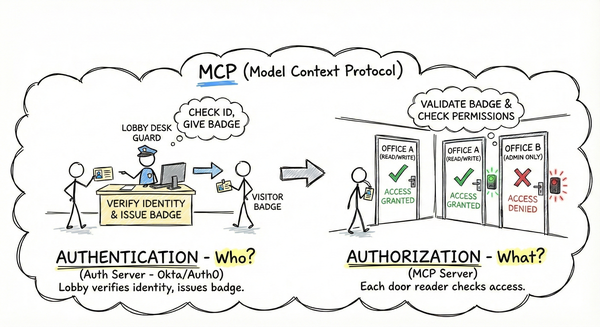
- Authentication vs authorization in MCP
- Real-world deployment scenarios
- Threat modeling and attack vectors
- Implementation strategies for production
Security isn’t an afterthought. Build it in from day one.
References#
Additional Resources#
- Simon Willison on MCP Prompt Injection
- The MCP Tool Trap
- Secure MCP Server Deployment at Scale: The Complete Guide
- Help or Hurdle? Rethinking Model Context Protocol (Arxiv paper)
- Stacklok’s MCP Optimizer vs Anthropic’s Tool Search Tool
The GitHub MCP Server adds support for tool-specific configuration (Dec 2025) ↩︎ ↩︎
Introducing MCP CLI: A way to call MCP Servers Efficiently ↩︎
MCP Model Context Protocol and Its Critical Vulnerabilities ↩︎
Production deployment readiness - GitHub MCP Server Discussion ↩︎
What Is an MCP Gateway? Why Enterprises Are Adopting a Control Plane for MCP ↩︎
Secure Your AI Agents: A Deep Dive into Azure’s MCP Gateway with Entra ID ↩︎